
Castle ActiveRecord学习实践(8):数据有效性的验证
摘要:在我们录入数据时,对数据有效性的验证是必不可少的, ActiveRecord中如何去验证数据的有效性呢?本文将详细介绍这一内容。
主要内容
1.概述
2.使用Validation
3.如何扩展
一.概述
在录入数据时,对数据有效性的验证是必不可少的,很多时候我们在UI层上就会做一层验证,但有时也需要在底层做一些必要的处理,这就要用到ActiveRecord中的数据有效性的验证。ActiveRecord为我们提供了如下几个验证:
n ValidateEmail
n ValidateIsUnique
n ValidateRegExp
n ValidateNotEmpty
n ValidateConfirmation
二.如何使用
为了使用上面这些验证,我们必须用ActiveRecordValidationBase来代替ActiveRecordBase,即实体类必须继承于ActiveRecordValidationBase。
 [ActiveRecord("Customs")]public class Custom : ActiveRecordValidationBase
 {
{

 //
// }
}
ActiveRecordValidationBase类为我们提供了如下一个方法和属性:
|
方法|属性 |
说明 |
|
IsValid() |
返回验证是否通过 |
|
ValidationErrorMessages |
获取验证错误信息数组 |
下面看一个完整的例子代码,在这个程序中我们需要验证用户名不能为空,Email地址、邮政编码、电话号码的格式是否正确
[ActiveRecord("Customs")]public class Custom : ActiveRecordValidationBase{ private int _id; private string _name; private string _email; private string _address; private string _post; private string _phone; [PrimaryKey(PrimaryKeyType.Native)] public int ID {
{ get { return this._id; } set { this._id = value; }
 } [Property,ValidateNotEmpty] public string Name { get { return this._name; } set { this._name = value; } } [Property,ValidateEmail] public string Email { get { return this._email; } set { this._email = value; } } [Property] public string Address { get { return this._address; } set { this._address = value; } } [Property,ValidateRegExp(@"\d{6}")] public string Post { get { return this._post; } set { this._post = value; } } [Property,ValidateRegExp(@"(\(\d{3,4}\)|\d{3,4}-)?\d{8}")] public string Phone { get { return this._phone; } set { this._phone = value; } } public static void DeleteAll() { ActiveRecordBase.DeleteAll(typeof(Custom)); } public static Custom[] FindAll() { return ((Custom[])(ActiveRecordBase.FindAll(typeof(Custom)))); }}
编写一些简单的测试代码,大家有兴趣可以看一下:
[Test]public void TestNameValidation(){ //姓名为空 Custom custom = new Custom(); custom.Address = "TianJin"; custom.Email = "lhj_cauc@hotmail.com"; custom.Phone = "022-24096356"; custom.Post = "300192"; //错误消息数 int expectedError = 1; Assert.IsFalse(custom.IsValid()); Assert.AreEqual(expectedError,custom.ValidationErrorMessages.Length);} [Test]public void TestPostValidation(){ //邮政编码错误、Email错误 Custom custom = new Custom(); custom.Name = "Terry Lee"; custom.Email = "lhj_cauc#hotmail.com"; custom.Phone = "022-24096356"; custom.Post = "222t"; custom.Address = "Tianjin"; //错误消息数 int expectedError = 2; Assert.IsFalse(custom.IsValid()); Assert.AreEqual(expectedError,custom.ValidationErrorMessages.Length);} [Test]public void TestAllValidation(){ //全部正确 Custom custom = new Custom(); custom.Name = "Terry Lee"; custom.Email = "lhj_cauc@hotmail.com"; custom.Phone = "022-24096335"; custom.Address = "TianJin"; custom.Post = "300192"; //错误消息数 int expectedError = 0; Assert.IsTrue(custom.IsValid()); Assert.AreEqual(expectedError,custom.ValidationErrorMessages.Length);}
三.如何扩展
上面这些验证已经能够满足我们绝大多数的需求,但是我们也可以去添加自己的验证。来看看ActiveRecord中的Validation的类结构图(只画出了部分)
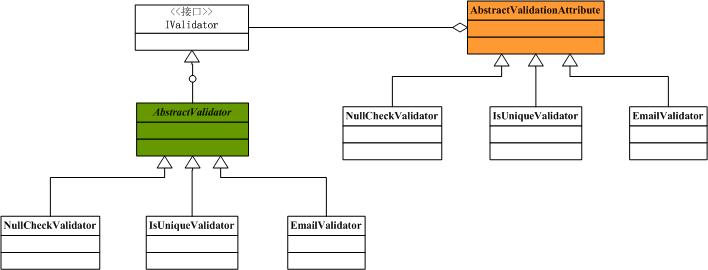
通过上图可以看到,如果想添加自己的验证,需要有一个继承AbstractValidator和继承于AbstractValidationAttribute的类就可以了,具体可以参考ActiveRecord的代码。
四.深入分析验证
通过上面的分析我们都知道所有的实体类都继承于ActiveRecordValidationBase基类,那么ActiveRecord是如何通过特性来进行验证的呢?下面我们结合源码进一步分析一下。
我们在属性上加上了验证, Attribute并不做任何实质性的工作,它只是调用验证器进行验证,先来看一下ValidateNotEmptyAttribute的代码:
[Serializable]public class ValidateNotEmptyAttribute : AbstractValidationAttribute{ public ValidateNotEmptyAttribute() : base(new NullCheckValidator()) { } public ValidateNotEmptyAttribute(String errorMessage) : base(new NullCheckValidator(), errorMessage) { }}
所有验证工作都是在Validator中进行的,以NullCheckValidator为例来看它做了什么操作:
[Serializable]public class NullCheckValidator : AbstractValidator{ public NullCheckValidator() { } public override bool Perform(object instance, object fieldValue) { return fieldValue != null && fieldValue.ToString().Length != 0; } protected override string BuildErrorMessage() { return String.Format("{0} is not optional.", Property.Name); }}
这个类其实很简单,但我们注意到有一个Perform的方法,正是这个方法完成了验证工作,拿这个例子来说,如果字段的值为空或长度等于零就返回false,否则为true。对于正则验证等其他的也都是在这个方法中完成。回到ActiveRecordValidationBase中去,看这个类初始化的时候做了什么操作?
/// <summary>/// Constructs an ActiveRecordValidationBase/// </summary>public ActiveRecordValidationBase(){ CollectValidators( this.GetType() );} /// <summary>/// Collect the validations applied to this class properties./// </summary>/// <param name="targetType"></param>private void CollectValidators( Type targetType ){ ActiveRecordModel model = GetModel( targetType ); if (model == null) { throw new ActiveRecordException("Seems that the framework wasn't initialized properly. (ActiveRecordModel could not obtained)"); } __validators.AddRange( model.Validators ); while( model.Parent != null ) { __validators.AddRange( model.Parent.Validators ); model = model.Parent; }}
在初始化的时候,通过ActiveRecordModel获取到当前实体所有属性对应的Validator,并放在了一个ArrayList中去,然后在IsValid()方法中再逐一调用Validator的Perform()方法来判断验证是否通过,因为所有的验证器都实现了Ivalidator。如果有验证发生错误,则把错误信息保存再一个字符数组中,可以通过属性ValidationErrorMessages来获取错误信息。
public bool IsValid(){ ArrayList errorlist = new ArrayList(); __failedProperties = new Hashtable(); foreach(IValidator validator in __validators) { if (!validator.Perform(this)) { String errorMessage = validator.ErrorMessage; errorlist.Add( errorMessage ); ArrayList items = null; if (__failedProperties.Contains(validator.Property)) { items = (ArrayList) __failedProperties[validator.Property]; } else { items = new ArrayList(); __failedProperties[validator.Property] = items; } items.Add(errorMessage); } } _errorMessages = (String[]) errorlist.ToArray( typeof(String) ); return errorlist.Count == 0;}在ActiveRecord中的数据有效性验证就介绍到这儿了,下篇我会介绍ActiveRecord常用的一些技巧。[非常感谢idior大哥提出的意见]
参考资料
Worktile,新一代简单好用、体验极致的团队协同、项目管理工具,让你和你的团队随时随地一起工作。完全免费,现在就去了解一下吧。
https://worktile.com



【推荐】国内首个AI IDE,深度理解中文开发场景,立即下载体验Trae
【推荐】编程新体验,更懂你的AI,立即体验豆包MarsCode编程助手
【推荐】抖音旗下AI助手豆包,你的智能百科全书,全免费不限次数
【推荐】轻量又高性能的 SSH 工具 IShell:AI 加持,快人一步
· Linux系列:如何用 C#调用 C方法造成内存泄露
· AI与.NET技术实操系列(二):开始使用ML.NET
· 记一次.NET内存居高不下排查解决与启示
· 探究高空视频全景AR技术的实现原理
· 理解Rust引用及其生命周期标识(上)
· DeepSeek 开源周回顾「GitHub 热点速览」
· 物流快递公司核心技术能力-地址解析分单基础技术分享
· .NET 10首个预览版发布:重大改进与新特性概览!
· AI与.NET技术实操系列(二):开始使用ML.NET
· 单线程的Redis速度为什么快?